
Domains
The various specialist areas that can be processed with the verinice management system are called domains. At the moment, it is planned that five domains will be included in verinice:
- DS-GVO
- IT baseline protection
- NIS2
- TISAX
- ISO 27000
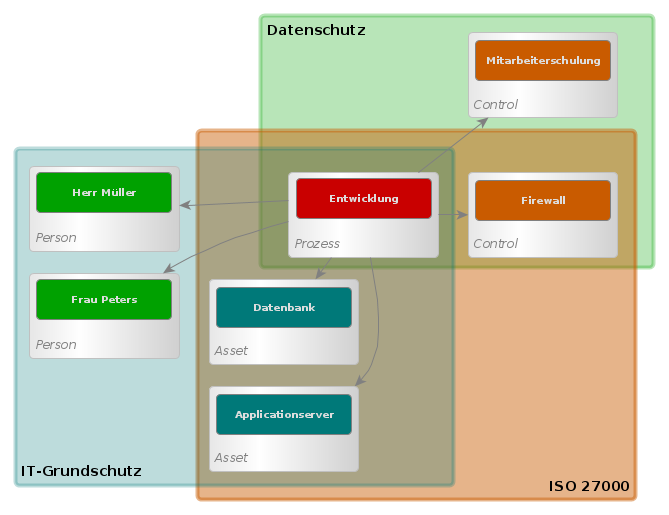 These domains can be used individually or combined. For example, users can start with the GDPR domain and create a record of processing activities there.
Later, it is possible to use the same objects that were created for this in the IT-Grundschutz domain. Domains can also be copied and extended. You can create your own domains, which may be derived from the existing ones.
Domains are created from domain templates.
Domain contents
A domain defines subtypes, aspects, links, forms, a catalog, profiles and, if applicable, risk definitions: 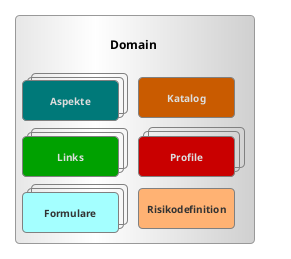
A subject object has a specific subtype for each domain.
A domain object contains several aspects. An aspect is a group of domain-specific attributes.
Links are relationships between two objects.
A form can be used to record exactly the data that is required for a specific use case from a domain.
A catalog is a collection of ready-made technical objects that can be applied to an ISMS model.
Profiles are collections of ready-made technical objects that have been modeled for a specific use case.
[Risk definition](#risk definitions) are configurations of the risk analysis.
Subtypes
The specific types of specialized objects in a domain are mapped via the subtypes. A domain defines a set of subtypes for each of the eight object types. It is also possible for a domain not to define any subtypes for an object type if this object type is irrelevant for the domain. A subtype from a domain must be assigned to a specific specialist object so that it can be used in the domain at all. The subtype of a functional object controls, among other things, which forms it is processed with and which other functional objects it may be linked to (see links).
Example
A process is to be created in the GDPR. To do this, one of the subtypes processing activity, data transfer and data protection impact assessment defined there must be selected. The process is created as a processing activity. It is then additionally associated with ISO 27000, whereby the subtype business process is selected. The process is now a processing activity in the context of the GDPR and a business process according to ISO 27000.
Aspects
In addition to basic properties such as name, description or abbreviation, a specialized object can also have domain-specific aspects. An aspect contains several attributes of a specialized object that are generally only valid in one domain. However, there are also shared aspects that are valid in several domains. A domain defines its available aspects together with attributes; each attribute has a name and a data type. If an aspect is defined identically in several domains, the aspect is considered to be shared. For a specialized object, the attributes of a shared aspect appear in all corresponding domains and the values are the same everywhere.
Example
A process from the GDPR contains an aspect with the data protection-relevant attributes Type of data transmitted, Data subject and Legal basis. At the same time, however, the same process can be a business process in the ISO 27000 domain and therefore contain an aspect from the ISO 27000 domain with the attributes Confidentiality, Integrity and Availability. 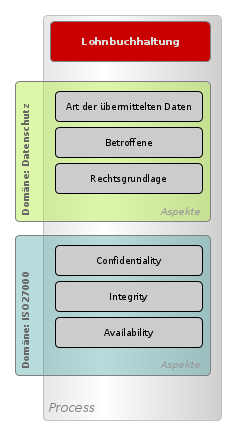
Links
A link establishes a domain-specific relationship to another specialized object. In addition to the linked object, a link also contains attributes that belong to the link. In addition to the link name and a series of attributes, the permitted subtype for the link target is also defined for each link in the domain.
Example
In a fictitious domain, controls are to be assigned to persons who are responsible for the control in a specific time period. For this purpose, a link Responsible is defined in the domain, which links controls to persons and contains the attributes From and To, with which the time period can be recorded. A specific control can have several responsible links to different persons, whereby each link has its own values for the attributes from and to. 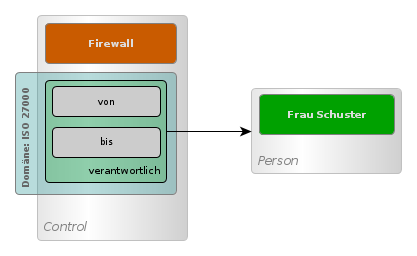
Forms
A domain contains any number of forms. These forms can be used specifically to edit the aspects and links in the objects contained in the domain and help users to implement the workflows required in the domain. The forms are only visible to users who work with the domain. Users can define new forms in the domain or modify and adapt existing ones. The article Forms describes the forms in verinice.
Catalog
The catalog is the set of all catalog elements in a domain. A catalog element serves as a template for a subject object. In order to be able to work with a catalog element in a unit, it must first be applied to the unit, i.e. its contents are copied to the target unit as a specialist object. A catalog element can have almost all the properties and relationships that a specialist object can have, such as a name, a description or parts. When a catalog element is applied, a new specialist object is created in the target unit and the properties and relationships of the catalog element are transferred to the specialist object. If the catalog element has relationships to other catalog elements, the referenced catalog elements are also applied to the unit. The types of relationships that are taken into account can be configured in the domain.
Example
The Domain IT-Grundschutz contains various Controls with the subtypes building block layer, building block & requirement as catalog elements. The controls are arranged hierarchically. For example, the 9 NET.1.2 Network Management module contains several requirements as parts and is itself a part of the 9 NET Networks and Communication module layer. If the 9 NET.1.2 Network management module is applied to an empty unit, the module itself is copied to the unit as a specialized object, as are all its requirements. However, the entire building block layer 9 NET Networks and Communication is not copied, because the IT-Grundschutz domain is configured so that only parts of catalog elements are automatically applied, but not higher-level composites.
A subject object that was created from a catalog element is a copy that remains permanently linked to the catalog element. This enables both the individual adaptability of the object and the comparison with the catalog content in the further life cycle of the object. The link between the specialist object and the catalog element can also prevent a catalog element from being accidentally applied to the same unit more than once.
Profiles
A profile is a collection of specialist objects that have been modeled for a specific use case. Many of the specialist objects in the profiles come from the catalog in the domain. In the profiles, the entries from the catalog are used multiple times in different scenarios. Profiles therefore contain ready-made ISMS models that can be used as templates. They contain instructions and examples for the practical use of verinice.
Risk definitions
A risk definition is the configuration of the risk analysis in a domain. The parameters for calculating the risk can be customized in the risk definition. It is possible for several risk definitions to be stored in a domain so that a different risk definition can be used depending on the Scope. It is also possible for a domain to contain no risk definitions at all if the recording of risks is not intended in the domain.
Inspection
An inspection is a check or validation of a specialized object. It is used to ensure that certain conditions or criteria are met. Inspections are linked to a severity level and a description. They are saved and managed to ensure a consistent assessment of the functional objects.
An inspection is displayed to users in order to offer corrections or comments for individual subject objects. It can also contain suggestions(“quick fixes ”) to rectify the identified deviation directly.
An inspection can use decisions to arrive at its assessment. For example, a decision can determine whether a DPIA is required, and the inspection uses this result to provide the user with a corresponding recommendation or correction option.
Example
In data protection, an inspection could determine that a data protection impact assessment (DPIA) is mandatory but has not yet been carried out. The inspection can then directly offer the action of adding the DPIA.
Decision
A Decision evaluates a technical object using a list of Rules (see below) to determine a Boolean result value. The first applicable rule determines the result (first-hit policy). Decisions are used to carry out a systematic and comprehensible evaluation on the basis of several rules.
A decision shows the user the final result of the evaluation.
Example
A decision could determine whether a data protection impact assessment (DPIA) is required for a specialist object. It shows exactly which rule was responsible for this decision and how it was evaluated. This enables transparent traceability of the decision-making process.
Rule
A rule is a configurable condition that is applied to a functional object to determine whether it fulfills certain criteria. Rules are part of a decision and provide an initial value that becomes the result of the decision if the rule applies. The evaluation is based on predefined conditions.
Examples
- “High risk present for the specialist object”
- “Process activity is on the positive list”
Difference: Decision vs. inspection vs. rule
- Rule: Represents a single condition that is applied to specialist objects. Rules are part of a decision and determine the result based on their conditions.
- Decision: Combines several rules to evaluate a specialist object and determine a final result. The user is shown transparently which rule was decisive for the decision.
- Inspection: Provides the user with hints or suggestions for correction and can contain a suggestion to make a direct adjustment. Relies on Decisions for this. These concepts work together to provide a powerful framework for evaluating and enforcing conditions on specialized objects within the domain.
Example
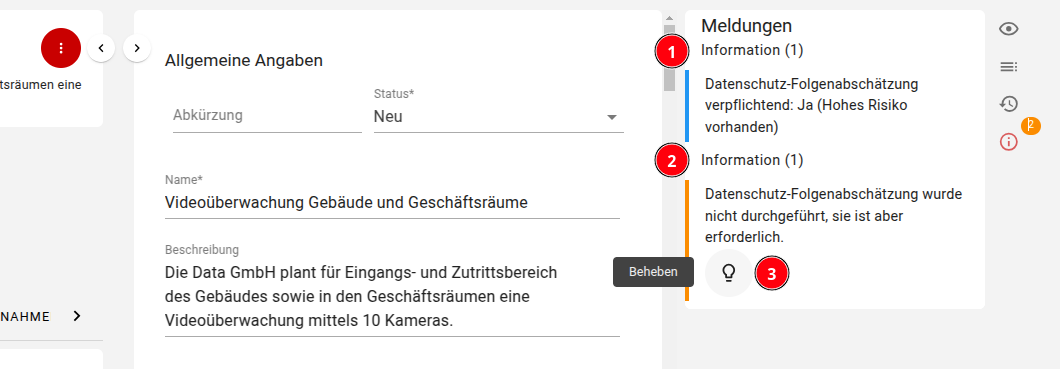
- the Decision indicates that the DSFA is required because the Rule “High risk present” applies.
- the Inspection states that a DPIA is required according to the decision (see above), but has not yet been carried out. It offers a suggestion to add the DPIA.
- the user can trigger the suggestion by clicking to add the DSFA directly.