
Profile in the ISO/IEC 27000 Domain
Working with Risk Profile according to DIN ISO/IEC 27001
A profile is a predefined set of example objects and already-applied catalog elements based on a specific catalog. It simplifies the setup and configuration of a Unit, as many required objects and relationships are already included. Unlike a catalog, a profile can represent relationships between objects.
Using a profile, you can load a complete example organization or a risk profile based on DIN ISO/IEC 27001 and apply it to your Unit – including associated scopes, assets, processes, threats, people, vulnerabilities, and security controls.
Benefits of the Risk Profile according to DIN ISO/IEC 27001
Profiles offer the following benefits:
- Quick start: You get a structured starting point for your ISMS.
- Time savings: Many elements are already preconfigured – no manual creation needed.
- Standards compliance: The contents follow recognized standards like ISO/IEC 27001 and ISO/IEC 27005.
- Simplified editing: The profiles include typical objects, relationships, and controls that can be directly adapted to your organization.
- Efficient risk analysis: Based on threats and vulnerabilities according to ISO/IEC 27005, many scenarios are predefined. These serve as potential risks and are already linked to typical assets. In addition, appropriate risk-mitigating measures from Annex A of ISO/IEC 27001 are assigned, significantly reducing the effort for risk identification and assessment.
Contents of the ISO/IEC 27001 Profile
The ISO/IEC 27001 profile provides example objects from the following areas:
- Organizational structure
- ISMS scope & scopes
- External service providers
- Business processes
- Assets
- People
- Information security incidents
- Documents & records
- Controls: Security measures and requirements from DIN ISO/IEC 27001
- Scenarios: Threats and vulnerabilities according to ISO/IEC 27005
Applying a Risk Profile according to DIN ISO/IEC 27001
A profile can be applied in two scenarios:
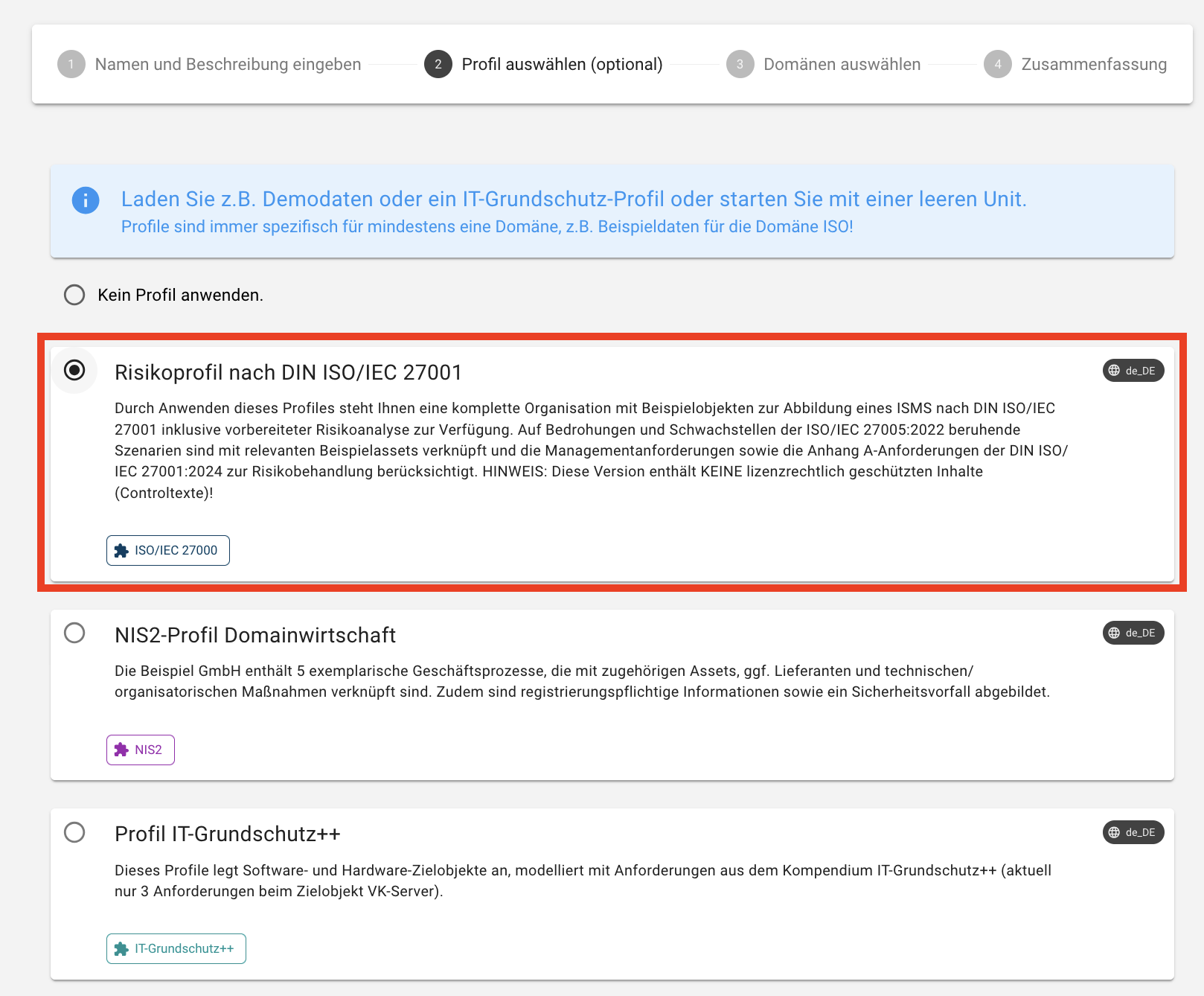
- When creating a new Unit: During the creation process, you can select a profile that is directly applied to the new Unit. To do so, navigate to the top left menu and click the Select Unit drop-down, scroll to the bottom, and choose Manage Units. Then click the Create Unit button in the lower right and in the second step of the wizard, select the option to apply the Risk Profile according to DIN ISO/IEC 27001:
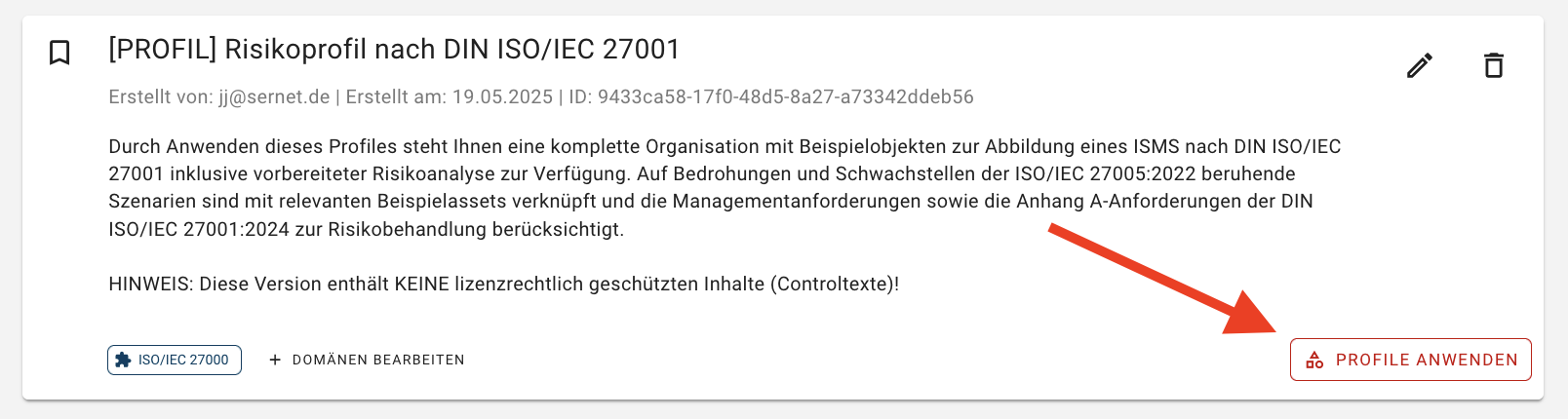
2.Subsequently for existing Units: Even after a Unit has been created, the risk profile according to DIN ISO/IEC 27001 can be applied retroactively. To access Unit management again, you can alternatively click on the verinice logo. For the corresponding Unit, click the Apply Profile button to apply the profile to an existing Unit:
Note
Applying a profile does not overwrite existing data. New objects will be added, and existing structures remain unchanged.
Please note:
The scopes, business processes, assets, people, and information security incidents included in the profile are example data intended as templates. These should be individually adapted to the conditions of your organization after applying the profile.
The controls included represent the requirements of DIN ISO/IEC 27001 (Annex A). They are not examples, but normative requirements that must be appropriately considered and implemented within your ISMS to achieve compliance with the standard.
The included threats and vulnerabilities are taken from ISO/IEC 27005. Based on this, example scenarios were modeled and linked to relevant assets and security measures. These scenarios serve as a starting point for risk analysis and can be adapted and further developed according to your specific conditions as part of the risk management process.